
Integration - DS site form features
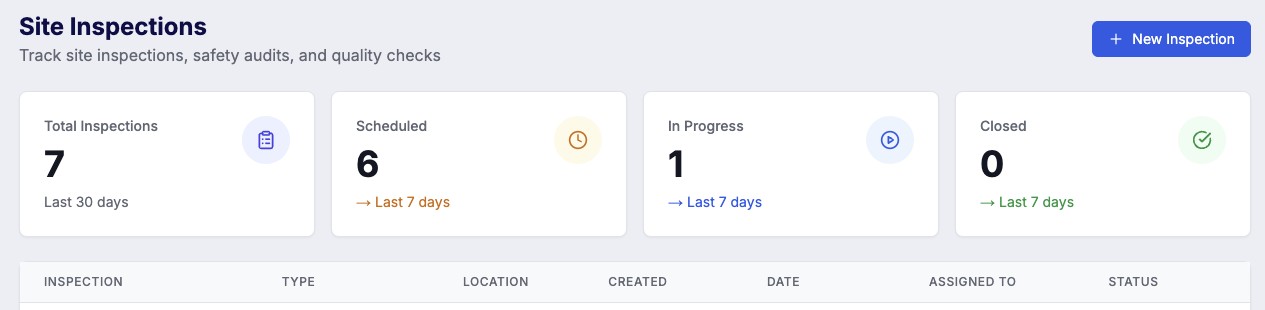
Forms System Enhancement Now Available in DS Platform Horizon App What's Changed Your forms are now available in the DS Platform Horizon app with a modern, improved interface. All your existing forms and data remain exactly the same - we've just made them easier to use and added powerful new features. Key Improvements ✅ All Your Forms Work the Same - Nothing you're familiar with has changed 🎨 Modern Interface - Cleaner, easier to navigate 🚀 New Features - Create, edit, and track forms more easily 📱 Consistent Experience - Same look and feel across all form types ⚡ Faster & Smoother - Quicker page loads and interactions What Stayed the Same Everything you're used to still works: ✓ All form types available (inspections, incidents, SWMS, etc.) ✓ All your saved forms and data ✓ All field types (text, dates, files, etc.) ✓ Draft saving ✓ Required field validation ✓ File uploads ✓ All your existing workflows Nothing is disrupted - your work continues as normal. What's New Available in Horizon App Forms are now fully integrated into the DS Platform Horizon app, not just the DS site. Access all your forms from one central location. Available in Horizon: Site Inspections Site Inductions SWMS Register Quality Defects Plant Inductions Permits to Work Incident Register First Aid Register ...and more Modern, Improved Interface Cleaner design - Less clutter, easier to read Better organized - Clear sections and navigation Responsive - Works on any screen size Faster - Smoother interactions and quicker loading Status Tracking Track where each form is in its lifecycle with clear status indicators: See at a glance if a form is pending, in progress, or closed Color-coded badges make status easy to identify Track progress from start to finish Examples: Inspections: Scheduled → In Progress → Closed Submittals: Draft → Pending → Approved/Rejected Incidents: In Progress → In Review → Closed Edit Existing Forms You can now edit forms after they've been submitted: Fix errors without starting over Update information as situations change Make corrections quickly and easily This saves time - no more recreating forms from scratch for small changes. Dashboard Views See important statistics at a glance: Total forms submitted Forms by status Recent activity Quick filters to find what you need Better Detail Views When viewing submitted forms: Professional, easy-to-read layout Images and files show previews All information clearly organized Print-ready formatting Quick Create Create new forms faster: Streamlined creation process Pre-filled fields when possible Clear, simple steps Immediate feedback Benefits for You Save Time Create forms in minutes, not hours Edit existing forms instead of starting over Find forms quickly with improved search and filters Work More Easily Modern interface is easier to navigate Clear status indicators show progress Better organized information Stay Consistent Same experience across all form types Consistent look and feel Easy to learn once, use everywhere Better Tracking See form status at a glance Dashboard shows what needs attention Clear history and progress How to Access Forms are now available in the DS Platform Horizon app: Log into DS Platform Navigate to the Horizon app Select the form type you need (HSEQ section) Create, view, or edit forms All your existing forms and data are already there waiting for you. Need Help? All your familiar forms work the same way New features are intuitive and easy to use Contact support if you have questions Summary What This Means for You: ✅ Forms now in Horizon app (not just DS site) ✅ Modern, easier-to-use interface ✅ All your existing forms and features preserved ✅ New capabilities: edit forms, track status, quick create ✅ Faster, more consistent experience ✅ Dashboard views for better overview The bottom line: Everything you could do before, you can still do - but now it's easier, faster, and you have more capabilities. Screenshots
How do you feel about this update?